River Assistant
The River Assistant is a chat panel for natural-language questions about the data in your river: top accounts, week-over-week shifts, why a band moved. Open it from the chat icon in the right sidebar.
Asking the assistant
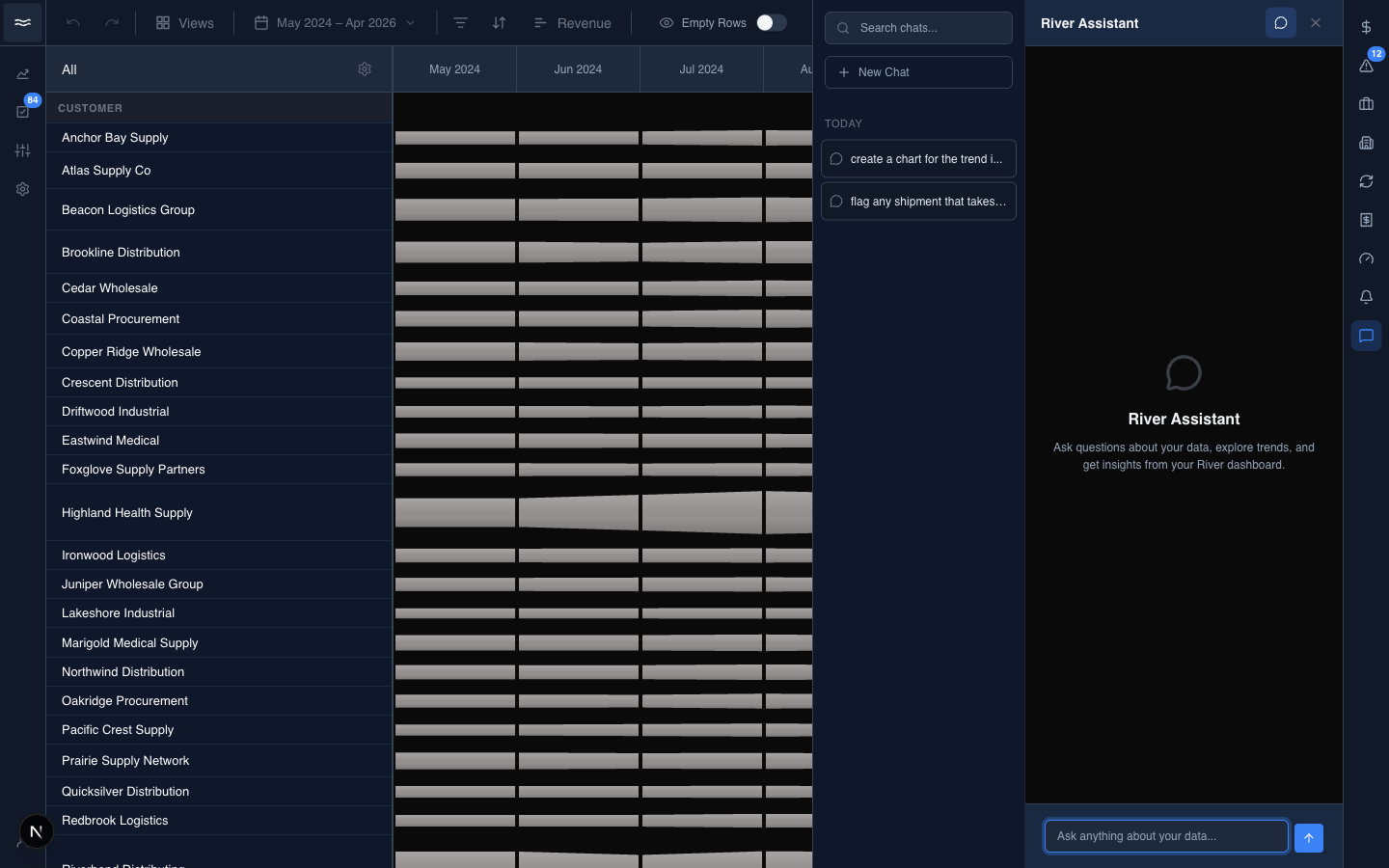
The empty state explains the scope: "Ask questions about your data, explore trends, and get insights from your River dashboard." Type into the composer (Ask anything about your data...) and press Return. The assistant can also generate charts. Generated charts land in the chart library tagged AI and can be added to any dashboard.
History
Past conversations appear in the Past Chats rail. Toggle the rail from the panel header. Entries are grouped by recency (Today, Yesterday, Last 7 Days, Last 30 Days, Older), with titles generated from the first message.
- Search chats at the top of the rail filters conversations by title.
- + New Chat opens a blank thread. The conversation persists only after you send the first message.
- Hover a past conversation to reveal the delete control, which asks for inline confirmation.
Sharing (read-only)
Each assistant reply has a small action bar: copy, helpful / not helpful feedback, and Share. Share creates a public link and copies it to your clipboard. Recipients see a read-only viewer that shows the conversation threaded inside the river page. They can scroll the chat and the river, but they cannot reply, ask follow-up questions, or edit anything.
There is no UI to revoke a shared link after it is created.